
Activity Classifier1.7 - Get APK
You'll be able to download in few seconds.
Publisher Description
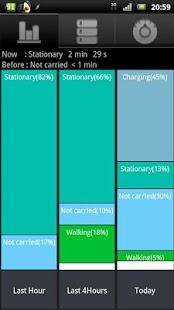
Quantify exercise intensity and classify by type using your handset accelerometers. Activity information is presented live in Google Fusion Tables as demonstrated at http://blog.urremote.com/2012/04/activity-data.html.
Aerobic intensity is measured in MET http://en.wikipedia.org/wiki/Metabolic_equivalent which is more meaningful than step counting with a pedometer. Optionally, Google My Tracks is started when intensive walking or running is detected to record exercise with more detail.
This information can be used to:-
- Provide information on total exercise, health and activity levels.
- Automate exercise tracking.
- Infer further lifestyle information by combining with other information sources, for example location data.
Activity Classifier draws less from your battery than pedometer apps as it has a 20% duty cycle. Power consumption is lower than Cell standby and Phone idle during testing shown in the sample screenshot.
Classification accuracy is increased if the accelerometers are calibrated. To do this, lay the phone flat on a level surface and touch the "Start Calibration now" entry on the settings screen. After completion place the handset on the long edge and repeat.
Select the "Keep Accelerometer On" option if you get a faulty accelerometer message too often. This will increase battery consumption but is necessary for the Xperia X10 and some other handsets. If you still regularly get a faulty accelerometer message in the task bar then your handset doesn't allow the accelerometers to function when the screen is off as discussed at http://code.google.com/p/android/issues/detail?id=3708 and this app will not be useful.
To see your activities on-line authorise access to Google Docs (Fusion Tables only) by touching the authorise request in the task bar to see your activities in two Fusion Tables. One has a full data set and the other is a subset of the first and intended to be shared with friends or published. The summary table is hyper-linked from the top of the activity list. Activity graphs as seen at http://blog.urremote.com/2012/04/activity-data.html are best viewed in a desktop browser as the SVG graphs do not display in most Android browsers.
Permissions:-
- Modify SD card contents - Used for "Copy Database to SDcard" command. Database can be viewed with Root Explorer app.
- Your location, MyTracks - Used for controlling the MyTracks app. MyTracks must be installed first. MyTracks uses location, this app doesn't.
- System Tools - Prevent phone from sleeping so as app can monitor activity when the screen is off.
- Read phone state and identity - Learn data connection state.
- Network communication - Used to upload activity data to Google fusion tables.
- Your accounts - Used to connect to your Google fusion tables after in app authorisation.
About Activity Classifier
The company that develops Activity Classifier is Avocado Fitness. The latest version released by its developer is 1.7.
To install Activity Classifier on your Android device, just click the green Continue To App button above to start the installation process. The app is listed on our website since 2013-11-28 and was downloaded 0 times. We have already checked if the download link is safe, however for your own protection we recommend that you scan the downloaded app with your antivirus. Your antivirus may detect the Activity Classifier as malware as malware if the download link to com.urremote.classifier is broken.
How to install Activity Classifier on your Android device:
- Click on the Continue To App button on our website. This will redirect you to Google Play.
- Once the Activity Classifier is shown in the Google Play listing of your Android device, you can start its download and installation. Tap on the Install button located below the search bar and to the right of the app icon.
- A pop-up window with the permissions required by Activity Classifier will be shown. Click on Accept to continue the process.
- Activity Classifier will be downloaded onto your device, displaying a progress. Once the download completes, the installation will start and you'll get a notification after the installation is finished.
Program Details
System requirements
Download information
Pricing
Version History
version 1.7
posted on 2013-11-28
V1.6 Using new fusion tables API,Database changed so a new database will be created. Recalibration needed.,App no longer closes after accelerometer failure is detected but attempts to recover.,When accelerometer is not functioning activity is recorded as Unknown.,Battery consumption considerably reduced when "Keep accelerometer on" option is selected.,Battery consumption largely unaffected by other apps increasing the sampling frequency.
version 1.4
posted on 2013-05-14
Several fixes and updates
Disclaimer
External Download
We do not host Activity Classifier on our servers. We did not scan it for viruses, adware, spyware or other type of malware. This app is hosted by Galad and passed their terms and conditions to be listed there. We recommend caution when installing it.
The APK Download link for Activity Classifier is provided to you by apps112.com without any warranties, representations or guarantees of any kind, so access it at your own risk.
If you have questions regarding this particular app contact the publisher directly. For questions about the functionalities of apps112.com contact us.
